Counts disagree
Separate sheets and delayed updates create different answers to a simple question: how much is available?
INVENTORY MANAGEMENT SYSTEM PHILIPPINES
ZenshoTech is a cloud-based inventory management system in the Philippines that helps businesses track stock levels, product movements, sales, low-stock items, inventory value, and branch-level quantities in one connected workspace.
Start free trial Contact sales
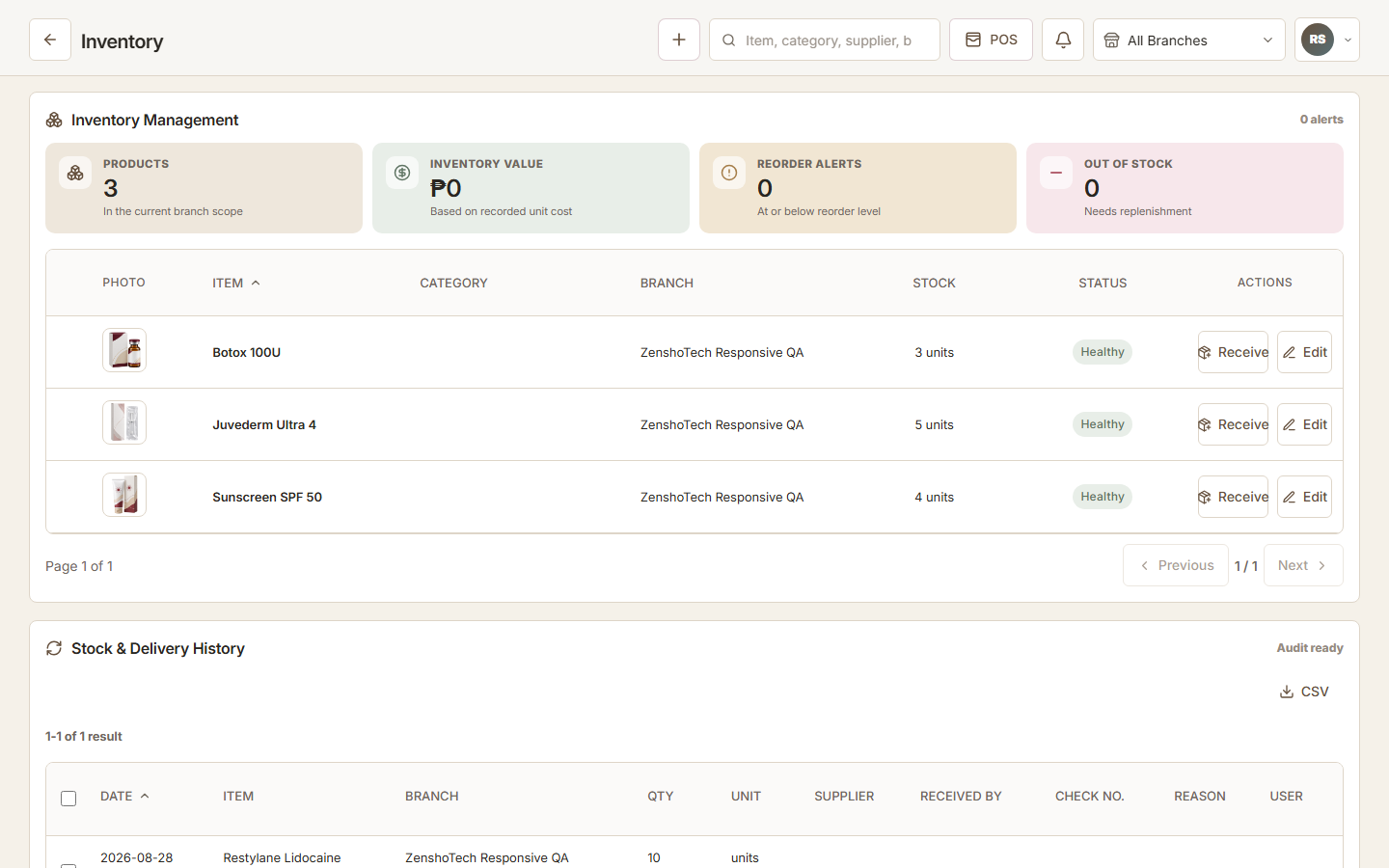
An inventory management system is software that helps a business record and monitor its products, stock levels, receiving, sales, transfers, adjustments, and reorder needs. ZenshoTech connects those inventory records with point of sale, authorized branches, customers, and reports so teams can see what is available and why quantities changed.
Separate sheets and delayed updates create different answers to a simple question: how much is available?
Important products are noticed only when staff need them and the shelf is already empty.
Without movement context, teams cannot easily understand whether stock changed through receiving, sale, transfer, or correction.
Review recorded quantities, product details, stock value, and low-stock items from an online workspace.
Connect inventory-aware product sales with stock activity instead of updating a separate spreadsheet after checkout.
Review and manage quantities in the locations each authorized user is permitted to access.
Keep receiving, sales, transfer, and adjustment context associated with the relevant item.
Use configured thresholds to identify products and consumables that need attention before they run out.
Organize items with consistent names, SKUs, categories, units, and other identifiers used by the business.
Standardize item names, units, categories, branch ownership, and starting quantities.
Use the appropriate receiving, sale, or adjustment workflow instead of overwriting a total.
Check low-stock and unusual movement before placing orders or correcting records.
Use regular physical counts to find process gaps and keep system quantities dependable.
An owner can review permitted stock by location, identify a low item, and inspect recorded movement before deciding whether to reorder, transfer, or investigate a count difference.
Yes. ZenshoTech is a web-based business platform, so authorized users can access its inventory workspace through a supported browser and internet connection.
Yes. Inventory records and user visibility can be associated with operational branches and permissions.
Yes. Inventory-aware product sales can create connected stock activity when products and branches are configured correctly.
ZenshoTech is offered as part of its business management plans rather than as a separate inventory-only subscription. Visit the pricing page for current Philippine-peso plan prices, inclusions, and branch limits.
No. A system improves recording and visibility, but regular physical counts remain important for identifying shrinkage, damage, entry mistakes, and process gaps.
ZenshoTech can organize products and consumables, but a business should validate its exact consumption workflow during a demonstration before relying on automatic service-level deductions.
Yes. Eligible new businesses can use a seven-day free trial, or request a guided demonstration focused on their current workflow.